
If you’re signed up for BookBub and would like to receive fewer emails, you have a few different options!
First, you’ll want to visit the BookBub website and sign into your account. Then click on your profile icon in the upper right area of the screen to open a drop down menu, and select “Email Subscriptions” from the options. Or, you can just click here to be taken to your email subscriptions on our site.
From the Email Subscriptions page, you can see what emails you’re currently signed up for and make changes to your current subscriptions.
If you’d like to get weekly emails about ebook deals instead of daily ones, go to the Featured Deals section at the top of the page, and under “Any deals that match my interests”, select “Once a week”, as shown in this example screenshot:
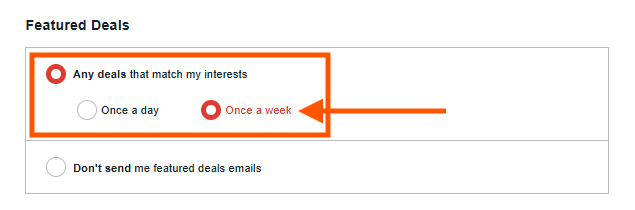
You can also select “Don’t send me featured deals emails” to opt out of these emails completely.
Further down on the Email Subscriptions page, you’ll see information about other types of emails we send, including emails about new releases, emails with articles from our blog, and more. To the left of each type of email, you’ll find a small box. If the box is filled in red with a white checkmark that means you’re currently subscribed to that type of email. If the box is empty, that means you’re currently unsubscribed from that type of email. To make a change, just click the box to subscribe/unsubscribe.
Once you’ve made your changes, be sure to select the red “Save Changes” button at the bottom of the page to save your selections!
If you have any questions about updating your email preferences, please don’t hesitate to reach out to our Support Team. You can get in touch with us here.